What Is Share Care?
Share Care is one of the most powerful features inside My Virtual Carer.
It allows you to securely invite trusted family members, carers, or professionals into a shared care circle around your loved one.
Everyone in the circle can see relevant updates in real time, including:
- Care plans
- Daily logs
- Tasks
- Notes
- Medication records
- Activities
This ensures everyone stays aligned, informed, and accountable.
Why Use Share Care?
✔ Reduced miscommunication
✔ Clear task ownership
✔ Safer handovers
✔ Less emotional pressure on one person
✔ Greater transparency across the care circle
Instead of being the single holder of all information, Share Care distributes visibility and responsibility safely.
This is coordinated care — without chaos.
Before You Start
The person you are inviting must:
✔ Have the My Virtual Carer app installed
✔ Have an active My Virtual Carer account
Without this, access cannot be granted.
Two Types of Access
Share Care offers two levels of access, depending on the role of the person you are inviting.
1️⃣ Co-Caregiver Access (Full Access)
Co-Caregivers have the same visibility and permissions as the Primary Caregiver.
They can:
- Access the full dashboard
- View and edit care plans
- Add and update logs
- Create tasks
- Manage activities and medication
- See everything you see
This is ideal for:
- A spouse
- An adult sibling
- A trusted family member sharing responsibility
Think of this as shared ownership.
2️⃣ Carer Access (Partial Access)
Carer Access provides limited, controlled visibility.
Carers can:
- View care items you have created
- See assigned activities
- View medication schedules
- Log updates where permitted
They cannot access full dashboard controls or manage profile settings.
This is ideal for:
- Paid carers
- Agency staff
- Support workers
- Professionals supporting care delivery
Think of this as structured support access.
How to Add a Co-Caregiver (Full Access)
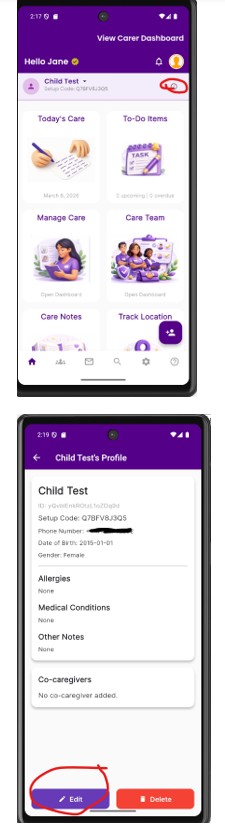
- Open the Care Recipient’s profile
- Select Edit Profile
- Choose Add Co-Caregiver
- Enter their account details
- Confirm access
You can also remove access from this same screen at any time.
How to Grant Carer Access (Partial Access)
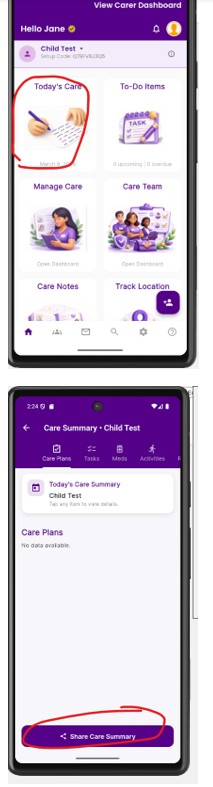
- Open the Today’s Care tab
- Select Share
- Choose the carer you want to invite
- Share Care
How to Manage Existing Access
To Remove Co-Caregiver Access:
- Go to the Care Recipient profile
- Open access settings
- View current users
- Remove co-caregiver access
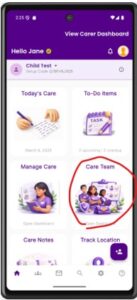
To Remove/Manage Carer Access (partial access): Go to the Care Team dashboard